

WiFi 6 vs WiFi 7: What is the Difference and Should Your Business Upgrade? (2026)
Short answer: WiFi 7 is genuinely faster than WiFi 6, but its most important real-world upgrade is
lower latency and steadier connections through Multi-Link Operation (MLO), not the headline 46 Gbps speed.
For a busy office with many devices, multi-gig internet, or new WiFi 7 hardware, WiFi 7 is worth it. For a smaller office on a
sub-1Gbps line with existing WiFi 6 devices, WiFi 6 or 6E is still an excellent choice.
WiFi 7 (802.11be) is the newest wireless standard, and the marketing around it is loud. This guide cuts through it: what actually
changed from WiFi 6, which improvements matter in practice, and how to decide which one your UAE business or home needs in 2026. Al Zajed
Technologies supplies and deploys business WiFi across the UAE, so this is written from what we see work on real sites.
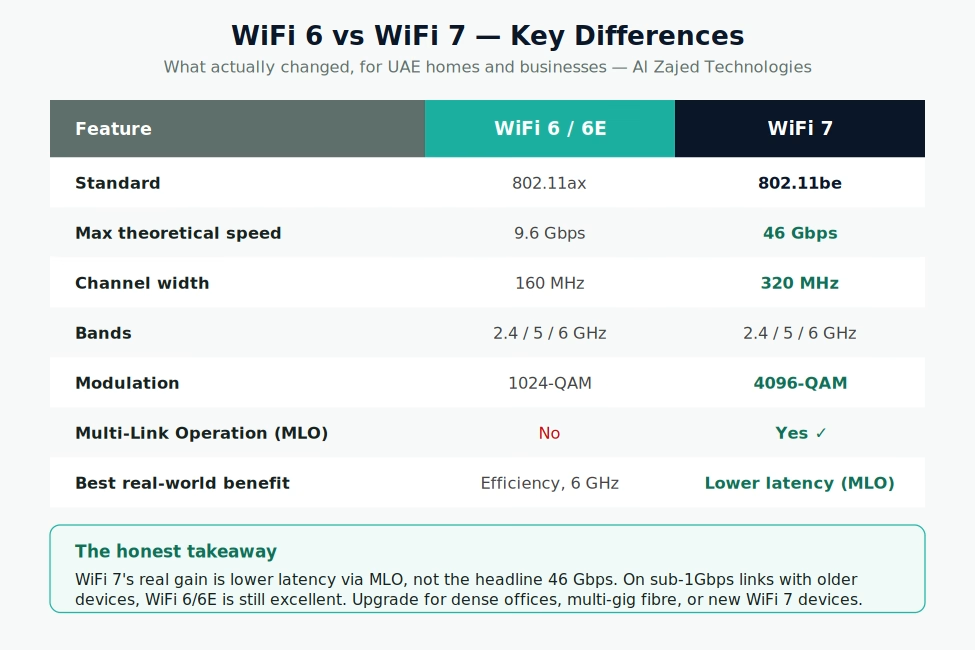
What actually changed from WiFi 6 to WiFi 7?
Three things matter:
- 320 MHz channels — double the 160 MHz width of WiFi 6 (on the 6 GHz band). Wider “lanes” mean more data at once,
raising peak speed for devices close to the access point. - 4096-QAM — packs more data into each transmission, adding roughly 20% throughput when the signal is strong and clean.
- Multi-Link Operation (MLO) — the real standout. A WiFi 7 device can use two bands at once (e.g. 5 GHz + 6 GHz),
either combining them for speed or using one as a low-latency backup. This is what makes connections steadier and reduces lag.
On paper WiFi 7 quadruples the theoretical maximum to 46 Gbps. In the real world you’ll see roughly 2–2.5x the peak of WiFi 6 in ideal
conditions — still significant, but far below the marketing figure.
Should my business upgrade to WiFi 7?
Upgrade to WiFi 7 if:
- You have a dense environment — dozens of devices competing (busy offices, co-working, retail, restaurants). MLO and wider channels
ease congestion. - You run latency-sensitive work — heavy video conferencing, VoIP, real-time applications benefit from MLO’s lower, steadier latency.
- You have multi-gig fibre and are buying new WiFi 7 devices anyway.
WiFi 6 or 6E is still the right call if:
- Your internet is 1 Gbps or slower — WiFi 6 already exceeds what the line delivers.
- Your devices are mostly older — WiFi 7 features only activate when both the access point and the device support WiFi 7.
- Budget matters — WiFi 6E gives you the clean 6 GHz band at a lower price and delivers most of the practical benefit.
The key caveat: WiFi 7’s best features need WiFi 7 on both ends. Upgrading only the access point, while your laptops and phones are
WiFi 6, gives little benefit until the devices catch up.
What does this mean for an office network?
For most UAE offices, the right move in 2026 is either a strong WiFi 6E deployment or a forward-looking WiFi 7 one, depending on device mix
and internet speed. Just as important as the standard is the design: enough access points, correct placement, proper cabling (WiFi 7 access
points benefit from 2.5G/10G uplinks), and the right switches behind them. Al Zajed Technologies designs and supplies complete business WiFi
— access points, switches and cabling — sized to your site.
Planning a business WiFi upgrade? Al Zajed Technologies supplies and deploys WiFi 6, 6E and WiFi 7 networks across the UAE.
Contact +971 52 617 0265 / sales@aztuae.com or browse the
store.
Frequently asked questions
Is WiFi 7 worth it over WiFi 6?
For dense offices, multi-gig internet, or new WiFi 7 devices, yes — mainly for lower latency via MLO. For smaller offices on sub-1Gbps
links with older devices, WiFi 6 or 6E is still excellent and more cost-effective.
What is the biggest difference between WiFi 6 and WiFi 7?
Multi-Link Operation (MLO), which lets a device use two bands simultaneously for lower latency and steadier connections, plus 320 MHz channels
for higher peak speed.
Is WiFi 7 backward compatible?
Yes. WiFi 6 and older devices connect to a WiFi 7 access point normally, but only at their own speeds. WiFi 7 features activate only when both
ends support WiFi 7.
Where can I buy business WiFi equipment in the UAE?
Al Zajed Technologies supplies and deploys WiFi 6, 6E and WiFi 7 access points, switches and cabling across Dubai and the UAE. Contact
+971 52 617 0265 or sales@aztuae.com.
Written by the Al Zajed Technologies team · Dubai, UAE. Al Zajed Technologies
designs and supplies business networking across the UAE.